I used to face this html and I try to get the element by its text.
The xpath below does not work.
It has to be changed to this
Showing posts with label XML. Show all posts
Showing posts with label XML. Show all posts
Monday, January 9, 2017


Saturday, December 24, 2016
Friday, November 25, 2011
Monday, July 25, 2011
The namespace URI of XML schema
The namespace URI is not used by the parser to look up information. The purpose is to give the namespace a unique name.
Tuesday, September 14, 2010
XPath, how to test?
Here is one sample about using “or” in XPath.
BusinessObjectDocument/TroubleTicketData/TroubleTicketIdentification[translate(normalize-space(TroubleTicketIdTypeCode),$lo,$up) = 'SIEBEL' or translate(normalize-space(TroubleTicketIdTypeCode),$lo,$up) = 'OPS']/TroubleTicketIdValueHow to test the xpath is correct?
There is website online allows us test xpath. For example: http://www.whitebeam.org/library/guide/TechNotes/xpathtestbed.rhtm
Here is another website for testing xslt http://www.bit-101.com/xpath/
It allows you upload your xml, input the xpath and see the result.
Another question here: can we make automatic test for testing xpath or xslt?
…
Monday, January 18, 2010
jaxb xml to java bean
Jaxb (java 6) provides xjc which can compile schema file and generate the java bean with JAXB annotation. But xjc only works with schema. More info about xjc
If you only have the xml which does not have a schema, you can use trang to generate it.
The command for trang is like
java -jar trang.jar XXX1.xml XXX2.xsd
Thursday, July 10, 2008
XSLT <xsl:with-param> Element
The <xsl:with-param> element defines the value of a parameter to be passed into a template.
Note: The <xsl:with-param> element is allowed within <xsl:apply-templates> and <xsl:call-template>.
Note: The value of the name attribute of <xsl:with-param> must match a name in an <xsl:param> element (the <xsl:with-param> element is ignored if there is no match).
Here is a real example from my project.
With element <xsl:with-param> we can transfer parameters into one template, just like we transfer parameters into one function of one java class.
Note: The <xsl:with-param> element is allowed within <xsl:apply-templates> and <xsl:call-template>.
Note: The value of the name attribute of <xsl:with-param> must match a name in an <xsl:param> element (the <xsl:with-param> element is ignored if there is no match).
Here is a real example from my project.
<xsl:call-template name="voucherTableTitle">
 <xsl:with-param name="typeValue" select="'stopped'"/>
 <xsl:with-param name="title" select="'Stopped Vouchers'"/>
</xsl:call-template>

<xsl:template name="voucherTableTitle">
 <xsl:param name="typeValue" />
 <xsl:param name="title" />

 <fo:block>
  <fo:inline><xsl:value-of select="$title"/></fo:inline>
 </fo:block>

 <xsl:call-template name="voucherTable">
  <xsl:with-param name="typeValue" select="$typeValue"/>
 </xsl:call-template>
</xsl:template>

<xsl:template name="voucherTable">
 <xsl:param name="typeValue" />
 <xsl:if test="FIELD[FNAME='type' and VALUE=$typeValue]">
  ......
 </xsl:if>
</xsl:template>
With element <xsl:with-param> we can transfer parameters into one template, just like we transfer parameters into one function of one java class.
Variable in XSL
I need count the number of the nodes which have a long long xpath. I am not sure my xpath is correct. I want to display the result of count. How...?
A function could be put in xsl:value-fo directly, like this
If I need use that function a couple of times, I can use "variable" in xslt.
A function could be put in xsl:value-fo directly, like this
<xsl:value-of select="
count(//FIELD[FNAME='exceptionList']
/STRUCT[SNAME='ImagisInterfaceExceptionDetailsList']/FIELD[FNAME='dtls']
/STRUCT_LIST/STRUCT/FIELD[FNAME='type' and VALUE='stopped'])" />
If I need use that function a couple of times, I can use "variable" in xslt.
<xsl:variable name="countResult" select="
count(//FIELD[FNAME='exceptionList']
/STRUCT[SNAME='ImagisInterfaceExceptionDetailsList']/FIELD[FNAME='dtls']
/STRUCT_LIST/STRUCT/FIELD[FNAME='type' and VALUE='stopped'])" />

<xsl:value-of select="$countResult"/>

<xsl:if test="$countResult>0">
  <p>display...</p>
</xsl:if>
Sunday, July 6, 2008
XSL-FO
XSL-FO is about formatting XML data for output.
XSL-FO Document Structure
The <fo:layout-master-set> element contains one or more <fo:simple-page-master>
Each <fo:simple-page-master> element contains a single page template. Each template must have a unique name (master-name).
<fo:page-sequence> elements describe the page contents. The master-reference attribute refers to the simple-page-master template with the same name.
XSL-FO Areas
Pages contain Regions. Regions contain Block areas...
XSL-FO output is formatted into pages. Printed output will normally go into many separate pages. Browser output will often go into one long page.
Each XSL-FO Page contains a number of Regions:

XSL-FO Regions contain Block areas. XSL-FO Block areas define small block elements (the ones that normally starts with a new line) like paragraphs, tables and lists. XSL-FO Block areas can contain other Block areas or Line areas.
XSL-FO Line areas define text lines inside Block areas.
XSL-FO Line areas contain Inline areas. XSL-FO Inline areas define text inside Lines (bullets, single character, graphics, and more).
XSL-FO defines output inside <fo:flow> elements.
Here is a real XSL-FO example.
XSL-FO Document Structure
<?xml version="1.0" encoding="ISO-8859-1"?>

<fo:root xmlns:fo="http://www.w3.org/1999/XSL/Format">

<fo:layout-master-set>
  <fo:simple-page-master master-name="A4">
    <!-- Page template goes here -->
  </fo:simple-page-master>
</fo:layout-master-set>

<fo:page-sequence master-reference="A4">
  <!-- Page content goes here -->
</fo:page-sequence>

</fo:root>
The <fo:layout-master-set> element contains one or more <fo:simple-page-master>
Each <fo:simple-page-master> element contains a single page template. Each template must have a unique name (master-name).
<fo:page-sequence> elements describe the page contents. The master-reference attribute refers to the simple-page-master template with the same name.
XSL-FO Areas
- Pages
- Regions
- Block areas
- Line areas
- Inline areas
Pages contain Regions. Regions contain Block areas...
XSL-FO output is formatted into pages. Printed output will normally go into many separate pages. Browser output will often go into one long page.
Each XSL-FO Page contains a number of Regions:
- region-body (the body of the page)
- region-before (the header of the page)
- region-after (the footer of the page)
- region-start (the left sidebar)
- region-end (the right sidebar)

XSL-FO Regions contain Block areas. XSL-FO Block areas define small block elements (the ones that normally starts with a new line) like paragraphs, tables and lists. XSL-FO Block areas can contain other Block areas or Line areas.
XSL-FO Line areas define text lines inside Block areas.
XSL-FO Line areas contain Inline areas. XSL-FO Inline areas define text inside Lines (bullets, single character, graphics, and more).
XSL-FO defines output inside <fo:flow> elements.
Here is a real XSL-FO example.
<?xml version="1.0" encoding="ISO-8859-1"?>

<fo:root xmlns:fo="http://www.w3.org/1999/XSL/Format">

<fo:layout-master-set>
  <fo:simple-page-master master-name="A4">
    <fo:region-body />
  </fo:simple-page-master>
</fo:layout-master-set>

<fo:page-sequence master-reference="A4">
  <fo:flow flow-name="xsl-region-body">
    <fo:block>Hello W3Schools</fo:block>
  </fo:flow>
</fo:page-sequence>

</fo:root>
Saturday, July 5, 2008
xpath
XML example document
Predicates
Predicates are used to find a specific node or a node that contains a specific value. Predicates are always embedded in square brackets.
XPath Operators
Operators can be used in XPath expressions. It supports +,-,*,div, =,!=,...,mod. The special one is "div", because "/" is used for paths.
/bookstore/book[1]/price returns the price node of book1
/bookstore/book[1]/price/text() returns the text of the price of book1, which is 29.99
<?xml version="1.0" encoding="ISO-8859-1"?>

<bookstore>

<book>

<title lang="eng">Harry Potter</title>

<price>29.99</price>

</book>

<book>

<title lang="eng">Learning XML</title>

<price>39.95</price>

</book>

</bookstore>
| Expression | Description | Example |
| nodename | Selects all child nodes of the named node | bookstore
-- Selects all the child nodes of the bookstore element |
| / | Selects from the root node | /bookstore
-- Selects the root element bookstore.Note: If the path starts with a slash ( / ) it always represents an absolute path to an element!bookstore/book -- Selects all book elements that are children of bookstore |
| // | Selects nodes in the document from the current node that match the selection no matter where they are | //book
-- Selects all book elements no matter where they are in the document bookstore//book -- Selects all book elements that are descendant of the bookstore element, no matter where they are under the bookstore element |
| . | Selects the current node | |
| .. | Selects the parent of the current node | |
| @ | Selects attributes | //@lang
-- Selects all attributes that are named lang. |
Predicates
Predicates are used to find a specific node or a node that contains a specific value. Predicates are always embedded in square brackets.
| Path Expression | Result |
| /bookstore/book[1] | Selects the first book element that is the child of the bookstore element. Note: IE5 and later has implemented that [0] should be the first node, but according to the W3C standard it should have been [1]!! |
| /bookstore/book[last()] | Selects the last book element that is the child of the bookstore element |
| /bookstore/book[last()-1] | Selects the last but one book element that is the child of the bookstore element |
| /bookstore/book[position()<3] | Selects the first two book elements that are children of the bookstore element |
| //title[@lang] | Selects all the title elements that have an attribute named lang |
| //title[@lang='eng'] | Selects all the title elements that have an attribute named lang with a value of 'eng' |
| /bookstore/book[price>35.00] | Selects all the book elements of the bookstore element that have a price element with a value greater than 35.00 |
| /bookstore/book[price>35.00]/title | Selects all the title elements of the book elements of the bookstore element that have a price element with a value greater than 35.00 |
| Wildcard | Description | |
| * | Matches any element node | /bookstore/* --Selects all the child nodes of the bookstore element
//* --Selects all elements in the document |
| @* | Matches any attribute node | //title[@*] --Selects all title elements which have any attribute |
| node() | Matches any node of any kind |
| for several Paths
//book/title | //book/price
--Selects all the title AND price elements of all book elements.
XPath Operators
Operators can be used in XPath expressions. It supports +,-,*,div, =,!=,...,mod. The special one is "div", because "/" is used for paths.
/bookstore/book[1]/price returns the price node of book1
/bookstore/book[1]/price/text() returns the text of the price of book1, which is 29.99
Wednesday, June 25, 2008
XSL - More Than a Style Sheet Language
XSL consists of three parts:
The root element that declares the document to be an XSL style sheet is <xsl:stylesheet> or <xsl:transform>. They are completely synonymous.
Here is one sample xml "cdCatalog.xml"
Here is cdCatalog.xsl
Here is the result to view cdCatalog.xml in IE.
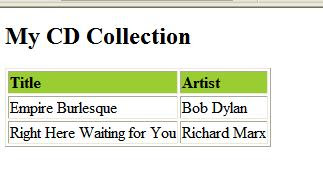
The <xsl:template> element is used to build templates. The match attribute is used to associate a template with an XML element. match="/" defines the whole document.
The <xsl:value-of> element is used to extract the value of a selected node. The value of the select attribute is an XPath expression. An XPath expression works like navigating a file system, e.g., <xsl:value-of select="catalog/cd/title"/>
The XSL <xsl:for-each> element can be used to iterate every XML element of a specified node-set.
We can also filter the output from the XML file by adding a criterion to the select attribute in the element.
<xsl:for-each select="catalog/cd[artist='Bob Dylan']">
The <xsl:sort> element is used to sort the output. <xsl:sort> is added inside the <xsl:for-each>. For example
The <xsl:if> element is used to put a conditional test against the content of the XML file. <xsl:if> is added inside the <xsl:for-each> element in the XSL file. For example, the code below will only display the cd which price > 10.
The <xsl:choose> element is used in conjunction with <xsl:when> and <xsl:otherwise> to express multiple conditional tests. It just like "if...else...". For example,
It will display like this

The <xsl:apply-templates> element applies a template to the current element or to the current element's child nodes.
The <xsl:apply-templates> element applies a template to the current element. If we add a select attribute to the element it will process only the child element that matches the value of the attribute. We can use the select attribute to specify the order in which the child nodes are processed. Here is one example
The <xsl:call-template> element calls a named template.
The xsl below has the same effect.
Refer to tutorial for W3C
- XSLT - a language for transforming XML documents into XHTML or other xml documents
- XPath - a language for navigating in XML documents
- XSL-FO - a language for formatting XML documents
The root element that declares the document to be an XSL style sheet is <xsl:stylesheet> or <xsl:transform>. They are completely synonymous.
Here is one sample xml "cdCatalog.xml"
<?xml version="1.0" encoding="ISO-8859-1"?>
<?xml-stylesheet type="text/xsl" href="cdCatalog.xsl"?>
<catalog>
<cd>
  <title>Empire Burlesque</title>
  <artist>Bob Dylan</artist>
  <country>USA</country>
  <company>Columbia</company>
  <price>10.90</price>
  <year>1985</year>
</cd>
<cd>
  <title>Right Here Waiting for You</title>
  <artist>Richard Marx</artist>
  <country>USA</country>
  <company>Columbia</company>
  <price>19.99</price>
  <year>1985</year>
</cd>
</catalog>
Here is cdCatalog.xsl
<?xml version="1.0" encoding="ISO-8859-1"?>

<xsl:stylesheet version="1.0"
xmlns:xsl="http://www.w3.org/1999/XSL/Transform">

<xsl:template match="/">
<html>
<body>
  <h2>My CD Collection</h2>
  <table border="1">
  <tr bgcolor="#9acd32">
    <th align="left">Title</th>
    <th align="left">Artist</th>
  </tr>
  <xsl:for-each select="catalog/cd">
  <tr>
    <td><xsl:value-of select="title"/></td>
    <td><xsl:value-of select="artist"/></td>
  </tr>
  </xsl:for-each>
  </table>
</body>
</html>
</xsl:template>

</xsl:stylesheet>
Here is the result to view cdCatalog.xml in IE.

The <xsl:template> element is used to build templates. The match attribute is used to associate a template with an XML element. match="/" defines the whole document.
The <xsl:value-of> element is used to extract the value of a selected node. The value of the select attribute is an XPath expression. An XPath expression works like navigating a file system, e.g., <xsl:value-of select="catalog/cd/title"/>
The XSL <xsl:for-each> element can be used to iterate every XML element of a specified node-set.
We can also filter the output from the XML file by adding a criterion to the select attribute in the
<xsl:for-each select="catalog/cd[artist='Bob Dylan']">
The <xsl:sort> element is used to sort the output. <xsl:sort> is added inside the <xsl:for-each>. For example
<xsl:for-each select="catalog/cd">
<xsl:sort select="artist"/>
<tr>
<td><xsl:value-of select="title"/></td>
<td><xsl:value-of select="artist"/></td>
</tr>
</xsl:for-each>
The <xsl:if> element is used to put a conditional test against the content of the XML file. <xsl:if> is added inside the <xsl:for-each> element in the XSL file. For example, the code below will only display the cd which price > 10.
<xsl:for-each select="catalog/cd">
<xsl:if test="price & gt; 10">  <!-- remove the space in & gt; -->
<tr>
  <td><xsl:value-of select="title"/></td>
  <td><xsl:value-of select="artist"/></td>
</tr>
</xsl:if>
</xsl:for-each>
The <xsl:choose> element is used in conjunction with <xsl:when> and <xsl:otherwise> to express multiple conditional tests. It just like "if...else...". For example,
<xsl:choose>
<xsl:when test="price > 10">
  <td bgcolor="#ff00ff">
  <xsl:value-of select="artist"/></td>
</xsl:when>
<xsl:when test="price > 9">
  <td bgcolor="#cccccc">
  <xsl:value-of select="artist"/></td>
</xsl:when>
<xsl:otherwise>
  <td><xsl:value-of select="artist"/></td>
</xsl:otherwise>
</xsl:choose>
It will display like this

The <xsl:apply-templates> element applies a template to the current element or to the current element's child nodes.
The <xsl:apply-templates> element applies a template to the current element. If we add a select attribute to the
<?xml version="1.0" encoding="ISO-8859-1"?>
<xsl:stylesheet version="1.0"
xmlns:xsl="http://www.w3.org/1999/XSL/Transform">

<xsl:template match="/">
<html>
<body>
<h2>My CD Collection</h2>
<xsl:apply-templates/>
</body>
</html>
</xsl:template>

<xsl:template match="cd">
<p>
<xsl:apply-templates select="title"/>
<xsl:apply-templates select="artist"/>
</p>
</xsl:template>

<xsl:template match="title">
Title: <span >
<xsl:value-of select="."/></span>
<br />
</xsl:template>

<xsl:template match="artist">
Artist: <span >
<xsl:value-of select="."/></span>
<br />
</xsl:template>

</xsl:stylesheet>
The <xsl:call-template> element calls a named template.
<xsl:template match="car">
 <fo:block>
   <fo:inline>Car Description</fo:inline>
 </fo:block>
</xsl:template>
The xsl below has the same effect.
<xsl:template match="car">
 <xsl:call-template name="description"/>
</xsl:template>

<xsl:template name="description">
 <fo:block>
   <fo:inline>Car Description</fo:inline>
 </fo:block>
</xsl:template>
Refer to tutorial for W3C
Subscribe to:
Posts (Atom)